

Qwen-Image-2.0
Qwen-Image-2.0 is Alibaba's multimodal image generation model that integrates image generation and editing with enhanced text-rendering, realistic textures, and photorealistic scenes
Alibaba just released Qwen-Image-2.0, and it redefines what image generation models can do with text. This is not another incremental improvement to text rendering - Qwen-Image-2.0 can generate complete PowerPoint slides, professional infographics, multi-panel comics, and intricate calligraphy directly from 1,000-token prompts. The model unifies generation and editing in a single architecture, delivering studio-quality outputs for both tasks. Available now on inference shell as Qwen Image 2 and the enhanced Qwen Image 2 Pro.
What makes this release significant is not just the text rendering - it's the combination of precision, complexity, and aesthetic composition. Previous models could render short text strings with varying success. Qwen-Image-2.0 renders entire documents with proper layout, alignment, and visual hierarchy. The practical result is AI-generated content that looks professionally designed rather than algorithmically assembled.
This post covers what Qwen-Image-2.0 actually delivers, the five characteristics that define its text rendering capability, and how to integrate it into your workflows.
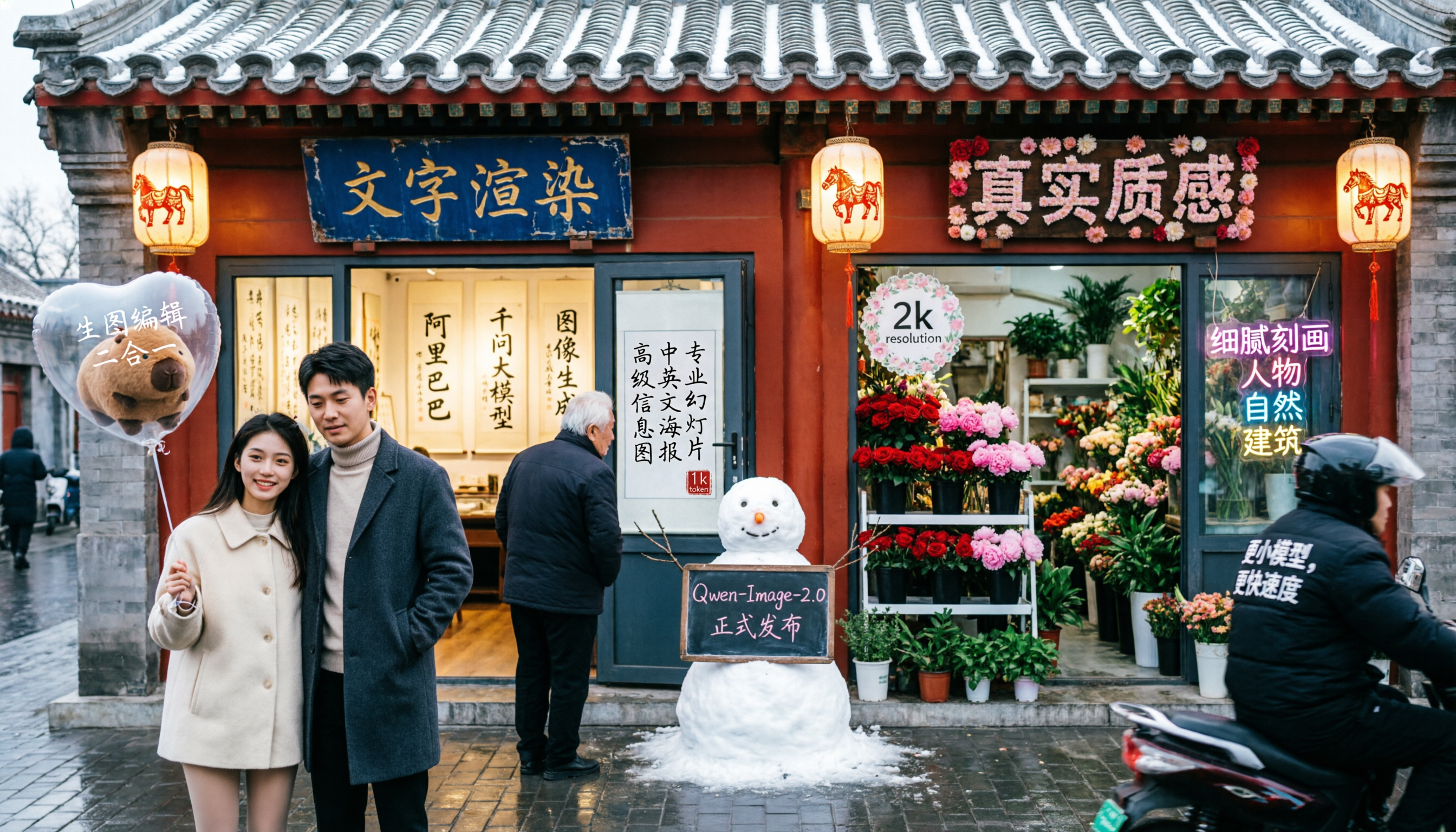
What Qwen-Image-2.0 Actually Is
Qwen-Image-2.0 is Alibaba's next-generation foundational image generation model, released in February 2026. It represents the convergence of two previously separate product lines: the generation track (focused on accuracy and realism) and the editing track (focused on functionality and consistency). The result is a unified model that excels at both tasks simultaneously.
The key capabilities include:
Professional Typography Rendering: The model supports 1,000-token instructions for direct generation of complex infographics - PPT slides, posters, comics, calendars, and more. This is not text overlaid on images. The model composes text and visual elements together with proper layout and hierarchy.
Stronger Semantic Adherence: Native 2K resolution (2048×2048) with finely detailed realistic scenes. People, nature, architecture, and textures render with photographic fidelity.
Unified Generation and Editing: A single model handles both text-to-image generation and image editing. Improvements to one capability automatically benefit the other.
Lighter Model Architecture: A 7B diffusion decoder paired with an 8B Qwen3-VL encoder. The model generates 2K images in seconds while maintaining visual quality.
The Five Characteristics of Qwen Text Rendering
Qwen-Image-2.0's text rendering capability can be understood through five characteristics: precision (准), complexity (多), aesthetics (美), realism (真), and alignment (齐).
Precision (准): Accurate Character Rendering
The model renders text accurately across scripts - Chinese characters, English, numbers, and special symbols. In generating the PPT slide that illustrates Qwen-Image's development history, every character renders correctly, including dates, project names, and technical terminology. The "picture-in-picture" compositions within the slide - showing before/after editing examples - maintain visual consistency between sub-images.
This precision extends to specialized typography. The model can render Emperor Huizong's distinctive "Slender Gold" calligraphy style, Wang Xizhi's small regular script, and modern typography systems. Each maintains the characteristic stroke patterns and proportions of the original style.
Complexity (多): 1,000-Token Instructions
Previous image generators struggled with prompts beyond a few sentences. Qwen-Image-2.0 handles prompts approaching 1,000 tokens - detailed specifications that would fill a full page of text.
Consider this A/B testing results infographic: the prompt specifies a three-column layout with test overview metrics, statistical analysis flowcharts, and business impact tables. Revenue uplift figures, confidence intervals, ROI calculations, flow arrows, color-coded indicators, and precise label positioning are all specified in the prompt. The model renders the complete infographic with every element in place.
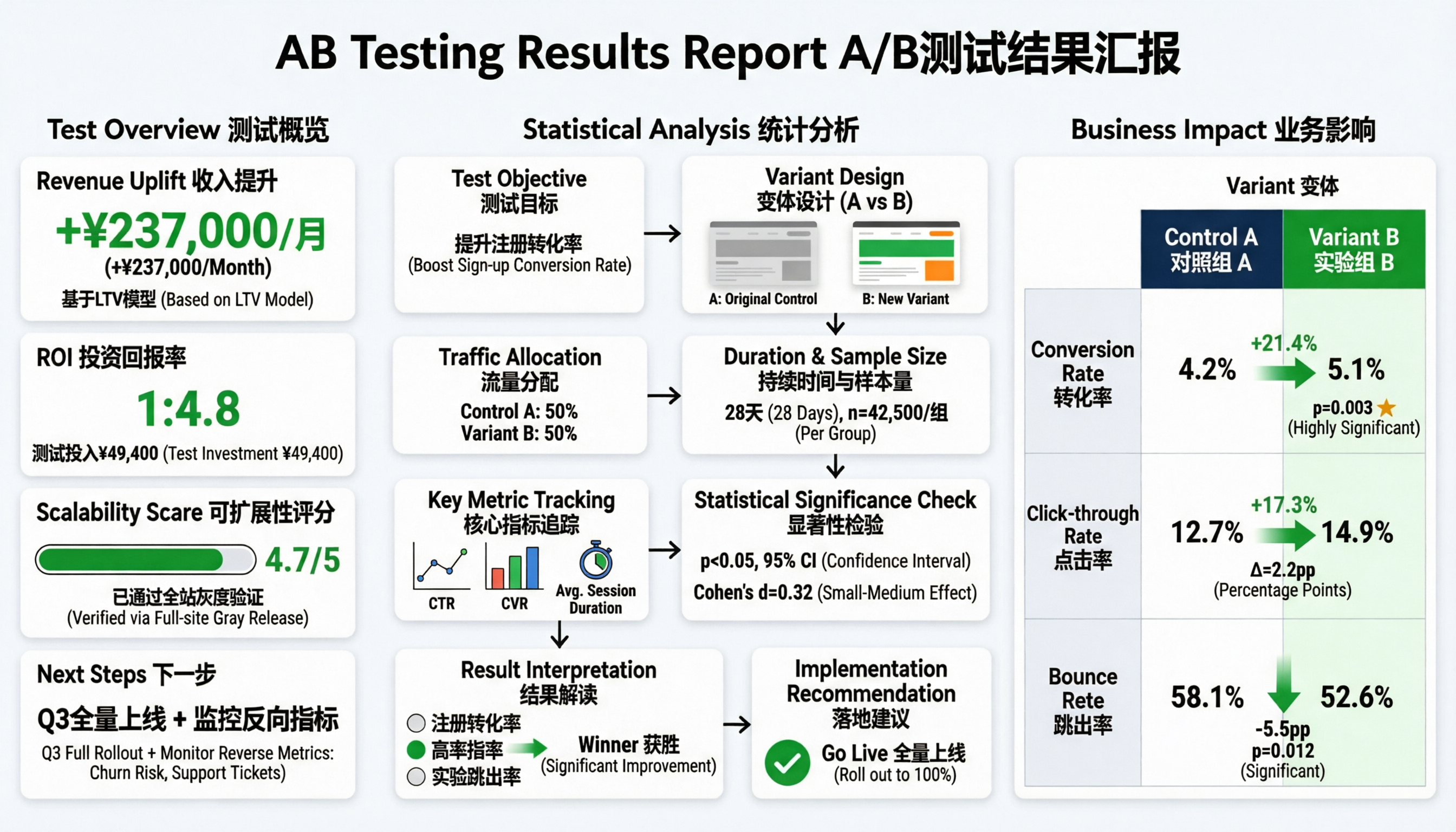
This complexity capacity transforms the model from a creative tool into a document generator. Professional infographics that would take hours to design can be specified in natural language and rendered directly.
Aesthetics (美): Layout and Composition
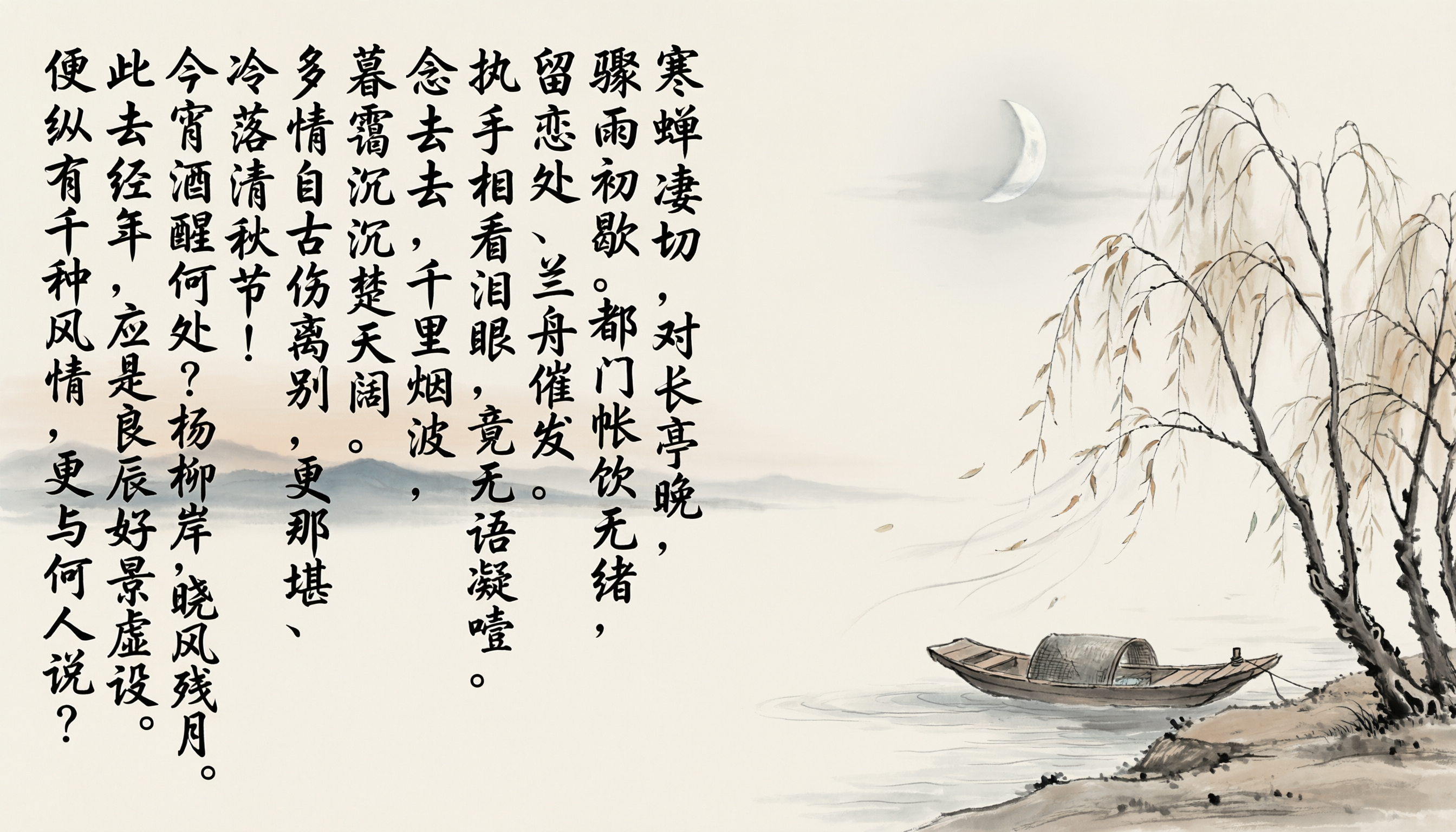
Beyond accuracy, the model demonstrates understanding of visual design principles. When generating mixed text-and-image compositions, text naturally flows into blank areas to avoid obscuring visual subjects. Calligraphy integrates with painted scenes following classical "poetry-calligraphy-painting" composition principles.
In generating a traditional Chinese ink painting with the complete text of Liu Yong's ci poem "Bells Ringing in the Rain," the model places vertical text columns alongside the painted elements - a lone boat on shallow water, willows, and a crescent moon. The text and imagery create a unified aesthetic rather than competing for attention.
Realism (真): Text on Real Surfaces
The model renders text on various surfaces with appropriate material properties - glass whiteboards with reflections, fabric with texture distortion, magazine covers with print fidelity. Each surface type affects how text appears, and the model maintains physical accuracy.
In a photorealistic office scene with a glass whiteboard, the model renders handwritten technical notes with natural pressure variation and subtle smudges. The whiteboard shows realistic reflections of the background window. Magazine covers in the background display crisp typography. A person's t-shirt shows the "Qwen-Image" logo with appropriate fabric stretching.
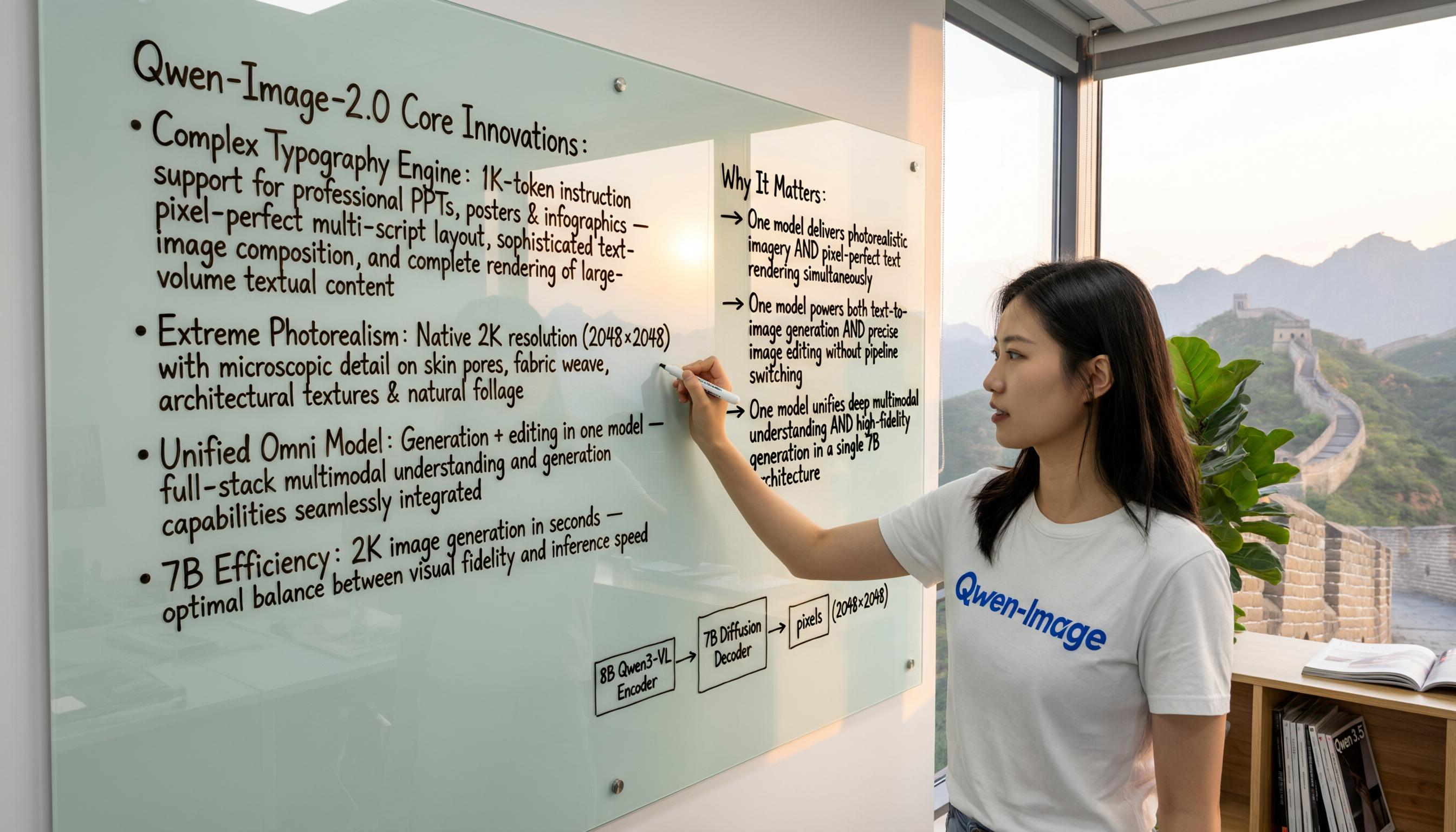
This realism extends to movie poster generation, where text must integrate with photorealistic imagery across multiple surfaces - title treatments, credits blocks, and taglines all rendered with production-quality fidelity.
Alignment (齐): Grid and Table Precision
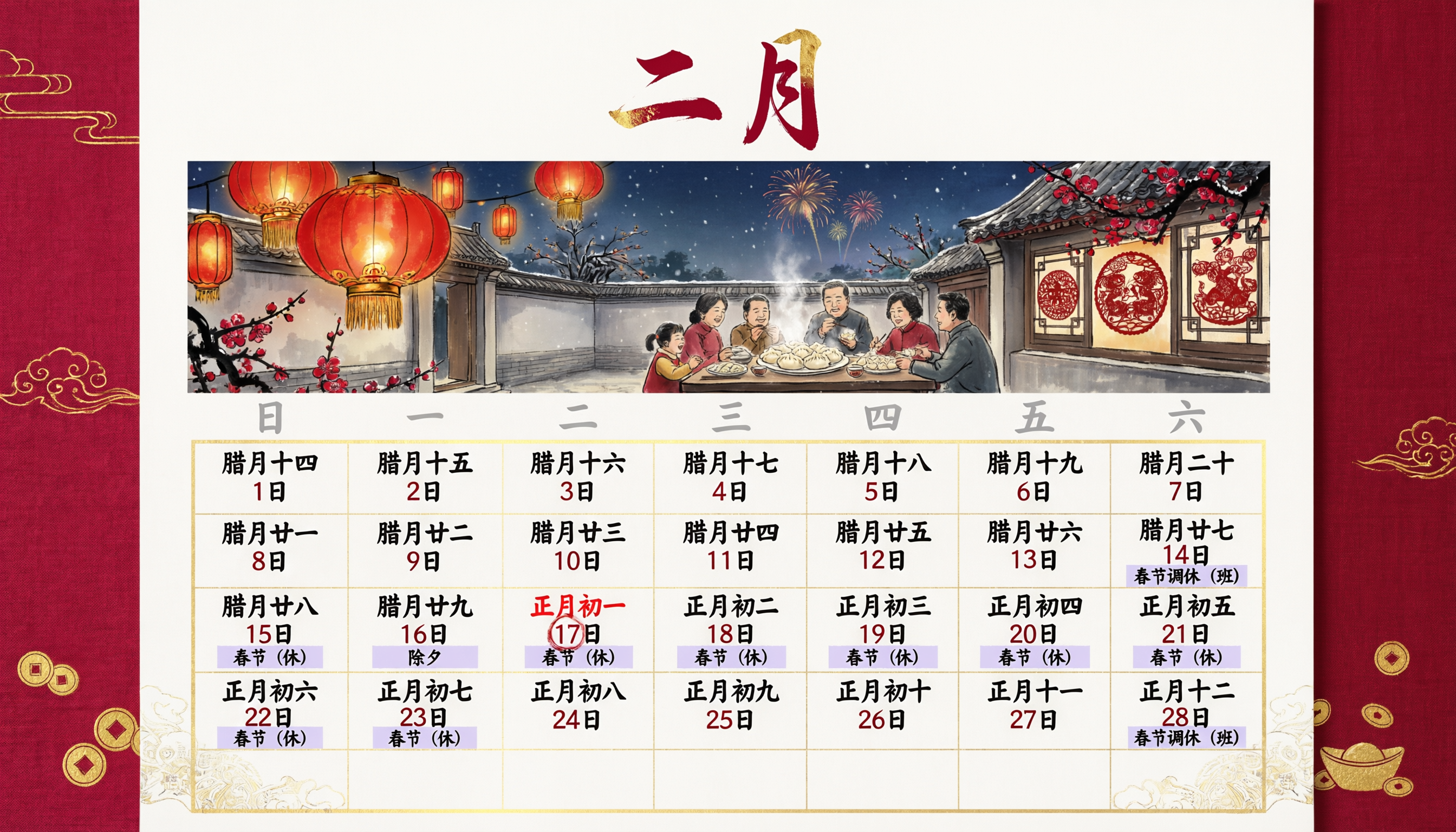
The model understands alignment principles for structured content. Calendar grids render with dates properly positioned in cells. Comic panels contain dialogue text centered in speech bubbles. Infographic elements align along consistent axes.
In generating a February 2026 calendar with traditional Chinese style, every date aligns within its cell, lunar calendar notations position correctly below Gregorian dates, and holiday markers (Spring Festival indicators) apply to the appropriate date ranges. The 7-column, 6-row grid maintains consistent cell sizing throughout.
Unified Generation and Editing
Because Qwen-Image-2.0 unifies generation and editing in a single model, improvements to text rendering and photorealism benefit both capabilities. The editing mode can:
Add text to existing images: Upload a landscape photo and have the model inscribe classical poetry onto it, matching the visual style and finding appropriate placement.
Generate image variations: Take a single portrait and generate a nine-panel grid showing different poses while maintaining subject identity.
Combine multiple source images: Merge two photos of the same person into a natural composite, handling lighting matching, perspective alignment, and background integration.
Cross-dimensional editing: Overlay cartoon characters onto real photographs while maintaining appropriate scale, shadows, and integration with the photographic background.
The same model handles all of these tasks, eliminating pipeline complexity and ensuring consistent quality across workflows.
Photorealistic Scene Generation
Beyond text, Qwen-Image-2.0 delivers significantly improved photorealism in pure image generation. The model accurately renders:
Complex physical interactions: A prompt describing "a horse riding a human" (reversing the typical relationship) produces an anatomically correct horse with visible musculature pressing down on a struggling man, cracked earth texture, and atmospheric dust.
Subtle color gradations: A summer forest scene prompt specifying "23 distinct shades of green" produces output with visible differentiation across moss types, leaf surfaces, tree bark, and atmospheric haze - each with appropriate texture and light interaction properties.
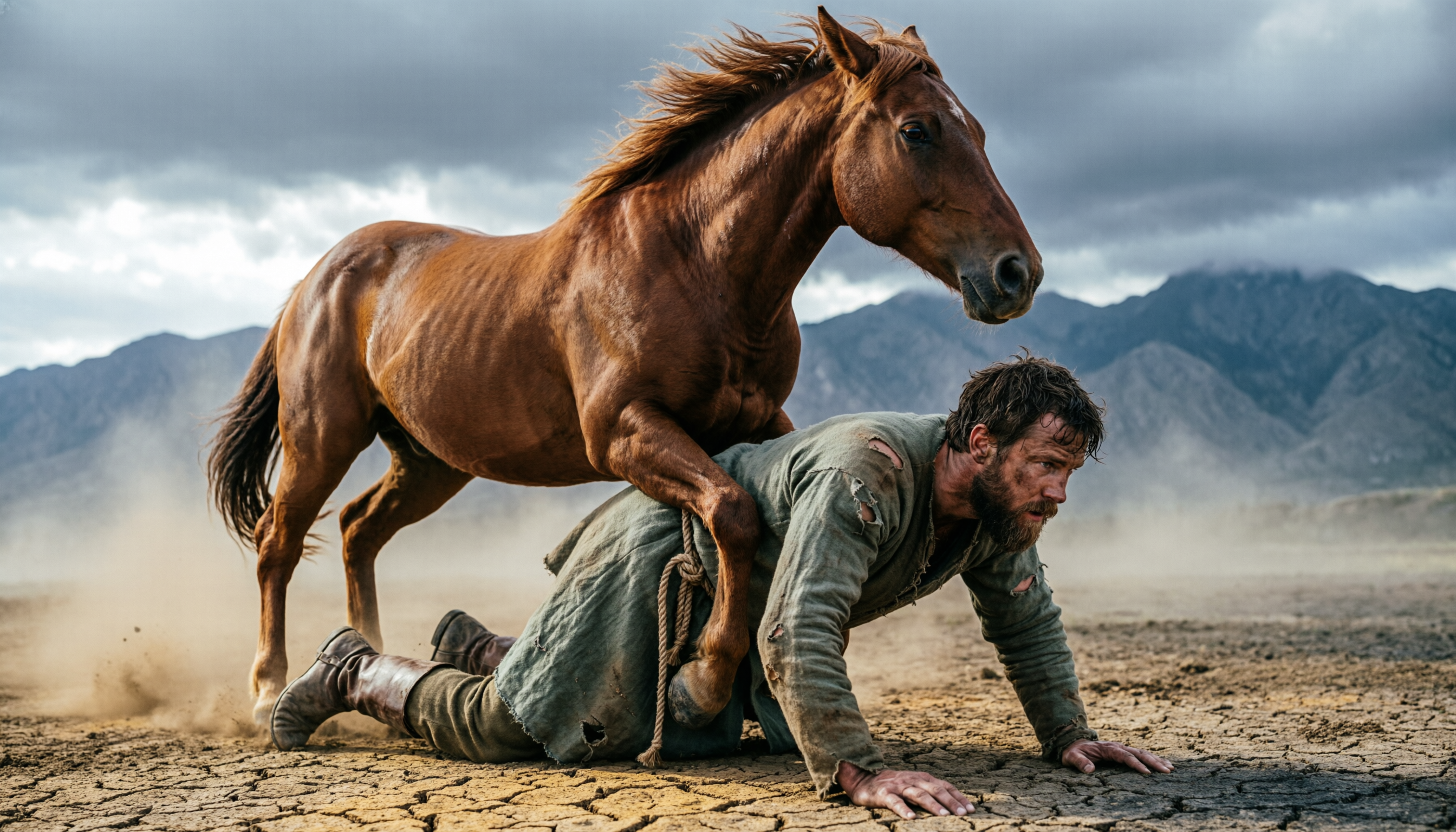
The native 2K resolution preserves these details at pixel level, making outputs suitable for large-format printing and professional design applications.
Qwen-Image-2.0 vs Qwen-Image-2.0 Pro
Both versions are available on inference shell:
Qwen Image 2 (alibaba/qwen-image-2): The standard model with full text rendering, photorealism, and editing capabilities. Optimized for speed and cost-efficiency.
Qwen Image 2 Pro (alibaba/qwen-image-2-pro): Enhanced version with stronger semantic adherence, finer detail rendering, and improved performance on complex prompts. Better for professional production workflows.
Both models use the same unified architecture and support the same input/output formats. The Pro version delivers higher quality at the cost of additional compute time.
Using Qwen-Image-2.0 on inference shell
Basic text-to-image generation:
1from inference import Client23client = Client()4result = client.run("alibaba/qwen-image-2", {5 "prompt": "A professional PPT slide showing Q4 sales metrics with bar charts, trend lines, and key performance indicators. Title: 'Q4 Revenue Analysis'. Include actual numbers and percentage changes.",6 "size": "1024x1024"7})Image editing with text addition:
1result = client.run("alibaba/qwen-image-2", {2 "prompt": "Add elegant calligraphy of a classical Chinese poem to the upper left corner, flowing vertically from right to left",3 "image": "https://example.com/landscape.jpg"4})Complex infographic generation:
1result = client.run("alibaba/qwen-image-2-pro", {2 "prompt": """Generate an OKR methodology infographic with:3 - Central title "OKR工作法" with subtitle "提升团队效率"4 - Four connected modules: Implementation Flow, Efficiency Mechanisms, Common Challenges, Key Principles5 - Color-coded elements: red for Objectives, blue for Key Results6 - Flow arrows connecting related concepts7 - Small illustration of a person with marker in bottom right""",8 "size": "1024x1024"9})The API supports both Chinese and English prompts, with particularly strong performance on bilingual content and cross-lingual typography.
Where Qwen-Image-2.0 Excels
Professional document generation: PPT slides, infographics, reports, and dashboards can be generated directly from detailed text descriptions. The 1,000-token prompt capacity allows specifying complete document layouts.
Marketing and advertising: Movie posters, product advertisements, and campaign materials with proper typography integration. Text renders realistically on various surfaces and materials.
Educational content: Diagrams, charts, and explanatory graphics with accurate labeling. Scientific illustrations with proper annotation placement.
Creative writing support: Comic panels with dialogue, illustrated stories with captions, and visual narratives with text integration.
Bilingual and multilingual content: Strong performance on Chinese typography, calligraphy styles, and mixed Chinese-English layouts.
What This Means Going Forward
Qwen-Image-2.0 represents a significant capability jump for text-in-image generation. The combination of precision, complexity handling, aesthetic composition, surface realism, and grid alignment makes it suitable for professional content creation workflows that were previously impractical with AI generation.
The unified generation-and-editing architecture simplifies deployment. A single model handles both creation and modification, with improvements to either capability automatically benefiting the other.
We are excited to have both Qwen Image 2 and Qwen Image 2 Pro available on inference shell. The models open new possibilities for automated content generation where text and imagery must work together as designed elements rather than separate layers.
FAQ
What makes Qwen-Image-2.0 different from other image generators?
The headline difference is text rendering capability. Qwen-Image-2.0 can generate complete documents - PPT slides, infographics, comics - directly from prompts, with proper layout, alignment, and visual hierarchy. Other models struggle with more than a few words. Additionally, it unifies generation and editing in a single model, eliminating the need for separate pipelines.
What's the difference between Qwen Image 2 and Qwen Image 2 Pro?
Both use the same architecture and support the same features. Pro offers enhanced quality - stronger semantic adherence, finer detail rendering, better performance on complex prompts. Use the standard version for speed and cost efficiency; use Pro when output quality is the priority.
Can Qwen-Image-2.0 generate non-English text?
Yes, with particularly strong performance on Chinese typography, including traditional calligraphy styles (Slender Gold, small regular script, various brush styles). The model also handles mixed Chinese-English layouts and bilingual content well.
How does the editing capability work?
Upload an image alongside your text prompt. The model can add elements, modify existing content, combine multiple source images, and apply style transformations while maintaining coherence with the original content. The same model handles both generation and editing.
api reference
about
qwen-image-2.0 is alibaba's multimodal image generation model that integrates image generation and editing with enhanced text-rendering, realistic textures, and photorealistic scenes
get an api key
create one in settings → api keys. the examples read it from INFERENCE_API_KEY.
1export INFERENCE_API_KEY="inf_your_key"1. calling the api
install the client
nothing to install. any http client works; the examples use curl, and jq to read responses. every response wraps its result in a data field.
run and get result
send "wait": true to hold the connection until the task finishes. without it the call returns right away with the task still running.
12# "wait": true holds the connection until the task finishes.3# the response is {"data": {"id", "status", "status_text", "output", ...}}4curl -X POST https://api.inference.sh/apps/run \5 -H "Authorization: Bearer $INFERENCE_API_KEY" \6 -H "Content-Type: application/json" \7 -d '{8 "app": "alibaba/qwen-image-2",9 "input": {10 "prompt": "prompt"11 },12 "wait": true13 }'stream live updates
get real-time progress updates as the task runs. ideal for showing progress bars, partial results, or long-running tasks. send "stream": true and the response is a server-sent event stream that ends when the task does.
12# "stream": true answers with server-sent events until the task finishes3curl -N -X POST https://api.inference.sh/apps/run \4 -H "Authorization: Bearer $INFERENCE_API_KEY" \5 -H "Content-Type: application/json" \6 -d '{7 "app": "alibaba/qwen-image-2",8 "input": {9 "prompt": "prompt"10 },11 "stream": true12 }'run in the background
start the task and get its id back right away, then check on it later. for long tasks, or when you'd rather be called back, see webhooks.
1# without "wait" the call returns the task right away (status 1, "received")2TASK_ID=$(curl -s -X POST https://api.inference.sh/apps/run \3 -H "Authorization: Bearer $INFERENCE_API_KEY" \4 -H "Content-Type: application/json" \5 -d '{6 "app": "alibaba/qwen-image-2",7 "input": {8 "prompt": "prompt"9 }10 }' | jq -r '.data.id')1112# later: read its state. done when status is 10 (completed), 11 (failed) or 12 (cancelled)13curl -s https://api.inference.sh/tasks/$TASK_ID \14 -H "Authorization: Bearer $INFERENCE_API_KEY" | jq '.data | {status, status_text, output}'2. authentication
the api uses api keys for authentication. see the authentication docs for detailed setup instructions.
3. files
file inputs are automatically handled by the sdk. you can pass local paths, urls, or base64 data.
automatic upload
pass urls directly or use data uris for inline content.
1# pass URLs or data URIs as input values2curl -X POST https://api.inference.sh/apps/run \3 -H "Authorization: Bearer $INFERENCE_API_KEY" \4 -H "Content-Type: application/json" \5 -d '{6 "app": "alibaba/qwen-image-2",7 "input": {8 "image": "https://example.com/image.png",9 "audio": "data:audio/mp3;base64,..."10 },11 "wait": true12 }'manual upload
you can also upload files manually and use the returned url.
1# 1. create the file: the response has an upload_url and the file's uri2FILE=$(curl -s -X POST https://api.inference.sh/files \3 -H "Authorization: Bearer $INFERENCE_API_KEY" \4 -H "Content-Type: application/json" \5 -d '{"files": [{"filename": "image.png", "content_type": "image/png"}]}')67# 2. PUT the bytes to upload_url8curl -X PUT "$(echo "$FILE" | jq -r '.data[0].upload_url')" \9 -H "Content-Type: image/png" \10 --data-binary @image.png1112# 3. pass the uri as an input value13echo "$FILE" | jq -r '.data[0].uri'4. webhooks
get notified when a task completes by providing a webhook url. when the task reaches a terminal state (completed, failed, or cancelled), a POST request is sent to your url with the task result.
1curl -X POST https://api.inference.sh/apps/run \2 -H "Authorization: Bearer $INFERENCE_API_KEY" \3 -H "Content-Type: application/json" \4 -d '{5 "app": "alibaba/qwen-image-2",6 "input": {7 "prompt": "prompt"8 },9 "webhook": "https://your-server.com/webhook"10 }'webhook payload
your endpoint receives a JSON POST with the task result:
1{2 "event": "task.completed",3 "timestamp": "2024-01-15T10:30:05Z",4 "data": {5 "id": "task_abc123",6 "short_id": "abc123",7 "status": 10,8 "status_text": "completed",9 "output": { ... },10 "created_at": "2024-01-15T10:30:00Z",11 "updated_at": "2024-01-15T10:30:05Z"12 }13}5. schema
input
text prompt describing what to generate or edit. for editing, reference images by position (e.g., 'image 1', 'image 2').
reference images for editing (1-3 images). image 1 can be subject, image 2 clothing/style, image 3 pose, etc.
number of images to generate (1-6).
output width in pixels (512-2048). total pixels must be between 512*512 and 2048*2048.
output height in pixels (512-2048). total pixels must be between 512*512 and 2048*2048.
add 'qwen-image' watermark to bottom-right corner.
content to avoid in the generated image (max 500 characters).
enable prompt rewriting for more diverse content. disable for precise control.
random seed for reproducibility (0-2147483647).
Gemini Nano Banana 2.1
google/gemini-nano-banana-2-1
$1.50/M input, $0.0336–$0.1134/image (1K–4K), +$0.014/query Google Search
Grok Imagine Image 2.0
xai/grok-imagine-image-2-0
$0.04/img low 1k, $0.06/img low 2k, $0.06/img med 1k, $0.08/img med 2k; $0.01/source img (edits)
GPT Image 2.5 Sunburst
openai/gpt-image-2-5-sunburst
$0.006-$0.21 per 1024x1024 image: low $0.006, medium $0.013, high $0.053, xhigh $0.094, max $0.21. Larger sizes cost more; edits add ~$0.008 per reference image.
GPT Image 2.5 Flare
openai/gpt-image-2-5-flare
$0.006-$0.21/image at 1024x1024: low $0.0059, medium $0.0132, high $0.0527, xhigh $0.0937, max $0.2107. Larger sizes cost more; edits add ~$0.0083 per reference image.
Image Resize & Crop
eval/resize
from $0.00000277/sec
HappyHorse 1.0 Video Edit
alibaba/happyhorse-1-0-video-edit
$0.14/sec 720P, $0.24/sec 1080P, billed on input+output duration
HappyHorse 1.0 Text-to-Video
alibaba/happyhorse-1-0-t2v
$0.14/sec (720P), $0.24/sec (1080P)
HappyHorse 1.0 Image-to-Video
alibaba/happyhorse-1-0-i2v
$0.14/sec (720P), $0.24/sec (1080P)
HappyHorse 1.0 Reference-to-Video
alibaba/happyhorse-1-0-r2v
$0.14/sec (720P), $0.24/sec (1080P)
new models
Tripo Auto Rig
tripo/tripo-rig
3d$0.01/credit (rig check free, auto rig 25 credits, retarget 10 credits/animation)
Hunyuan 3D Auto Rigging
tencent/hunyuan-3d-auto-rigging
3d$0.02/credit, 10 credits/call ($0.20/call)
TokenRig
infsh/tokenrig
3dGPU time, billed per millisecond
Hunyuan 3D 3.1
tencent/hunyuan-3d-3-1
3d$0.02/credit; Geometry 15cr, Normal 25cr, +10cr views/PBR/face-count
Rodin Gen-2.5
hyper3d/rodin-gen-2-5
3d$0.58/credit; Extreme-High tier +0.5 credits, texture extreme-high +2 credits
ready to run Qwen-Image-2.0?
we use cookies
we use cookies to ensure you get the best experience on our website. for more information on how we use cookies, please see our cookie policy.
by clicking "accept", you agree to our use of cookies.
learn more.