
An introduction to the Bourne Shell
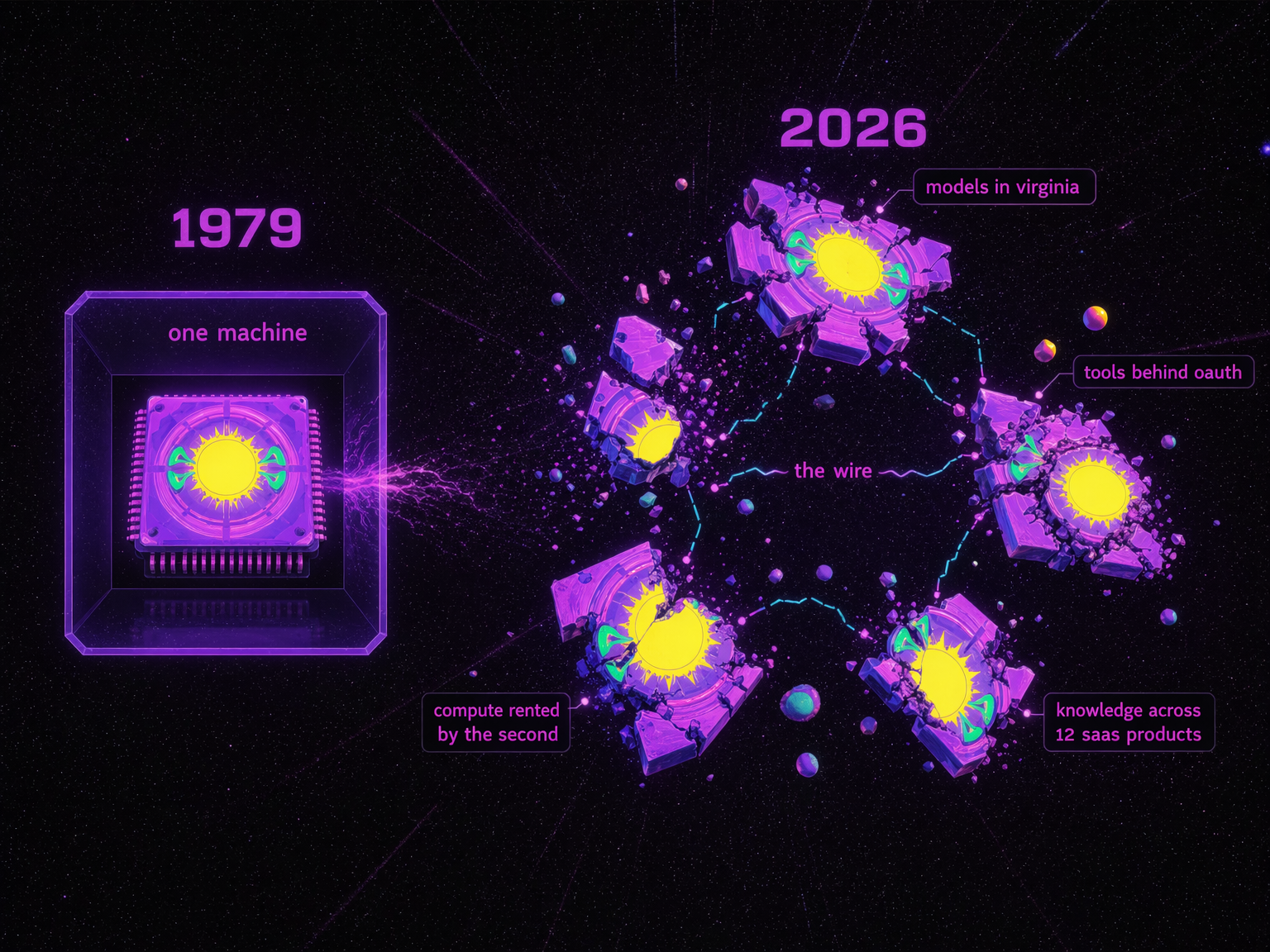
In 1979, Stephen Bourne made the first shell at Bell Labs. One machine, one interface, and one kernel. You didn't talk to the operating system directly; instead, you talked to the shell, which then talked to the rest of the system. Small Unix tools did the work. The shell composed them.
Ten years later, Brian Fox wrote Bash, the Bourne-Again Shell, because AT&T owned the first one. The free version became the default everywhere. For forty-seven years, that model stayed the same. One kernel, one shell, one machine.
But the kernel exploded. The models are somewhere in Virginia. The tools are behind OAuth walls (the "authorize this app" dance you do ten times a day). The compute is rented by the second. The knowledge is spread across twelve SaaS products, and nobody remembers which Slack thread had the answer. There isn't just one machine to shell into anymore.
People are arguing about how to build the best agent harness while missing what it actually is.
What is a harness?
If you live in Berlin and I say "harness," you might think of the clubs Berghain or Sisyphus. That's not the kind of harness we're talking about. But funny enough, what "harness" really means in AI is still a hot topic of debate. It really depends on how you define an agent, since that determines what the harness is.
Here's how an AI agent works today: you open something like Claude Code, Cursor, or Codex. You type a request. A large language model (LLM) reads your request, figures out which tools it needs, and calls them. It does this in a loop: think, decide, act, observe, think again. The harness is what manages this loop. It decides which tools are available, what context the model sees, how memory works, what's allowed and what's not.
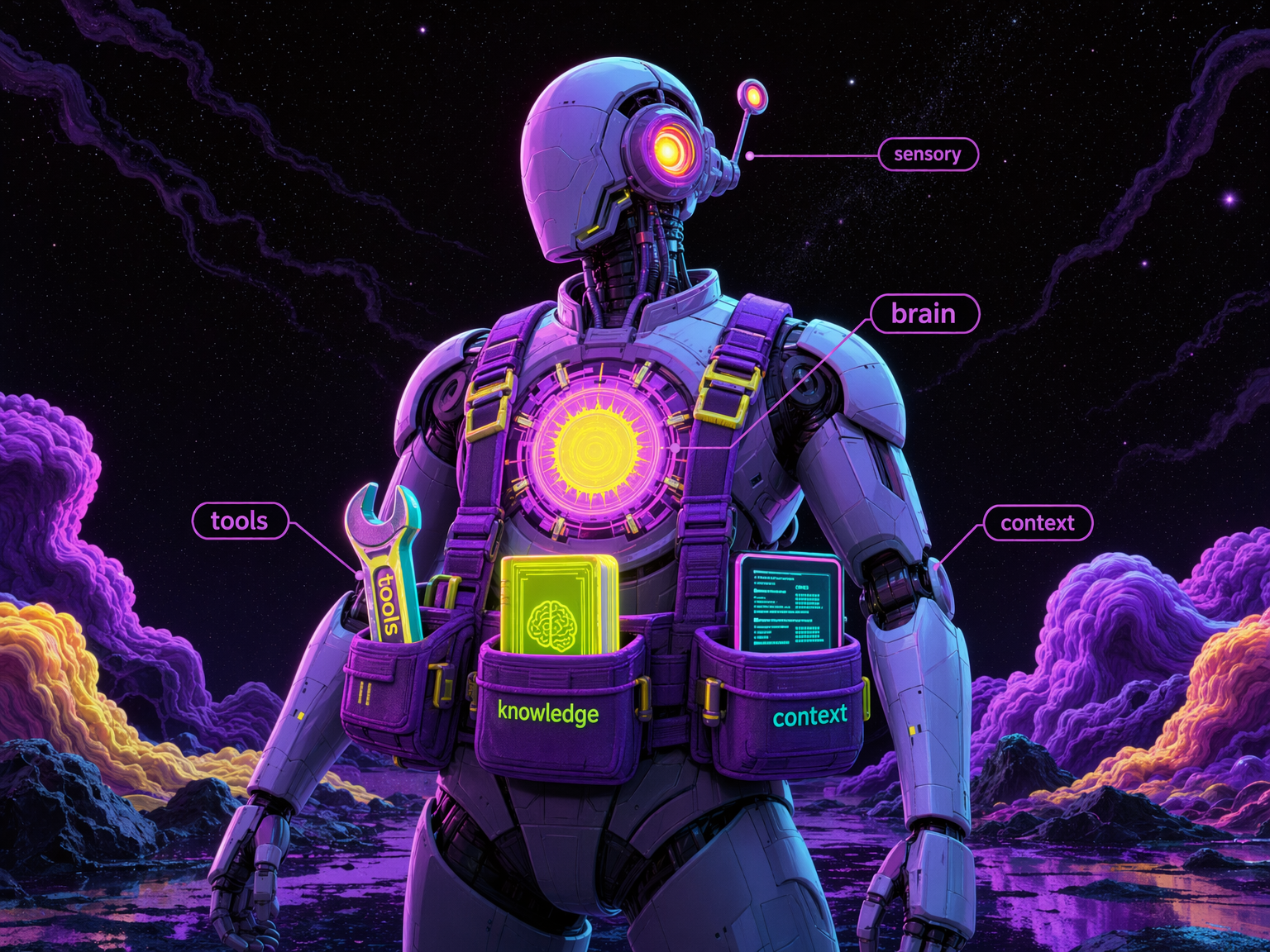
An agent is made of:
- Brain: the LLM. It reasons, generates text, makes decisions. But alone it can't do anything.
- Tools: what the agent can do. Triage your email, compose a video, organise your Linear board. Actions in the world.
- Knowledge: what the agent knows. Skills, memory, accumulated context from past sessions. The expertise that makes it useful beyond generic responses.
- Context: what the agent can see right now. Everything has to fit in a fixed window. The scarcest resource.
- Sensory / I/O: how the agent perceives the world and reaches you. Incoming signals, scheduled tasks, messaging channels.
The harness isn't any of these things. It's the glue layer that holds them together and decides what gets equipped when.
Mario Zechner explained at AI Engineer Europe (1:56) why he built his own harness called Pi: "My context wasn't my context. Claude Code is the thing that controls my context." System prompts change with every release, tools get removed or modified between versions, and system reminders get injected mid-conversation telling the model "this may or may not be relevant." Zero observability, zero model choice, almost zero extensibility. So he stripped it back to four tools, a system prompt that fits on a slide, and made the agent able to modify its own harness. "All I wanted was a shitty coding agent that is truly mine."
The harness matters because whoever controls it controls your agent's behavior. And I'll make a bold claim here: the harness is a shell. This is what I've been building at inference shell, and by the end of this piece I'll show you why.
tools and MCP
Tool calling is how an agent actually does things: it sends a structured request to a function (like "summarise this Slack channel" or "upscale this image to 4K") and gets a result back. MCP (Model Context Protocol) is a standard that lets agents connect to external services through a uniform interface, think of it like USB for AI tools. You install an MCP server, and your agent gets new capabilities.
For agents, the most important thing is tool calling. An LLM without tools is just a chatbot. Tools are what turn it into an agent. And the way tools get connected today is mostly through MCP. It's a protocol that standardizes how agents connect to outside services. It gives agents a well-known way to authenticate, get permission, and call tools with defined inputs and outputs.
But there are problems.
MCP servers are volatile. The spec has no versioning mechanism for individual tools. A server can change what its tools accept and return between restarts, and there's no versioning, no contract, no guarantee. The agent that worked yesterday might not work the same way today. You depend entirely on someone else's infrastructure behaving consistently. And there's no cost visibility. You call an MCP tool and have no idea what it costs until the bill arrives.
The other problem is portability. You install 10 MCP servers, run the OAuth flow for each one, configure them. Switch from Claude Code to Cursor? Start over. New laptop? Start over. Your connections are trapped in config files on one machine.
Anthropic's Soria Parra admits the ecosystem is still early (11:00): "Every time I see someone building another REST to MCP server conversion tool, it's a bit cringe." Most MCP servers today are lazy wrappers around existing services that don't use any of the protocol's real capabilities: fine-grained permissions, smart context management, or progressive discovery.
For the use cases where you just need to call a well-defined service reliably, generate a product video, run a web search, convert a file, durable versioned code with a stable contract is still the better answer. Not everything needs to be a live MCP connection. Sometimes you just need an app that does what it says on the tin, every time, with the same interface you called last month, and a clear price before you call it. On inference shell, every app is pinned to a version hash. You call google/veo-3-1-fast@ab3f1c09 today, what it accepts and what it returns are frozen. The behavior doesn't change. The pricing is visible upfront. MCP can't promise you any of that.
And for the MCP connections you do need, we centralize those too. One OAuth flow, then your tools are available everywhere:
1$ belt mcp connect linear2✓ Opening browser to authorize Linear...34$ belt mcp tools linear5linear — 35 tools6tool description7get_issue Retrieve detailed information about an issue8list_issues List issues in the user's Linear workspace9save_issue Create or update a Linear issue10list_projects List projects in the user's Linear workspace11save_comment Create or update a comment on a Linear issue12... (30 more)1314$ belt mcp run linear/list_issues --input '{"project": "INF"}'Your connections live on inference shell, not in config files on your laptop. Switch machines, switch harnesses, your connections follow you.
bash: the most popular tool given to agents
Bash is a command-line shell, the text interface where you type commands to tell your computer what to do. Most coding agents today use bash as their primary tool: they type commands into it just like you would.
Of all the tools given to agents, the most common one is bash. Most harnesses just hand the model a bash tool and call it a day. It's simple: one tool that can do many things. It's old and well-known, and agents are pretrained on mountains of bash usage, so they handle it well.
But Bash is a piece of history. Bourne made the first shell in '79 for one machine and one kernel. In '89, Fox rewrote it as Bash to make it free. The world was simpler. One computer, one filesystem, and one set of tools.
The core problem with bash is that it chains your agent to one physical machine. One operating system. One filesystem. One set of installed tools. And frankly, while they are battle-tested and standard, most of them are now half a century old.
Bash works for coding agents because most of what they do today is change files and push them somewhere. But coding is only a small part of what agents will do. The agent that handles your finances, runs your sales pipeline, or manages your team's knowledge doesn't live in a terminal editing source files. It needs to connect to SaaS apps, shared drives, APIs, things that have nothing to do with a local filesystem. David Soria Parra from Anthropic put it well (4:30): "Coding agents are the most ideal scenario — it's local, it's verifiable, you can call a compiler. But now we're going into general agents that do real knowledge worker stuff."
Giving bash to agents comes with an inherent security problem. The tradeoff for "now it can do everything" is "oh no, it really can do anything." Agents do run destructive commands, and the Claude Code leak showed it runs 23 security checks per bash execution. Vercel took a swing at this with just-bash. They reimplemented bash and ~100 Unix commands from scratch in TypeScript, running in an in-memory filesystem. They rebuilt the whole thing just to be able to control it.
But if you're going to replace bash entirely, rewrite it from scratch, ground up, why copy it? Why build the same commands with the same interfaces from 1979? You had a blank canvas. You could have built what agents actually need. Instead you get a TypeScript grep that may or may not match the real grep's edge cases, packaged as a stepping stone to Vercel's paid sandbox products. Their own README tells you: "Use Vercel Sandbox if you need a full VM with arbitrary binary execution." The free reimplementation points you to the paid infrastructure. Classic.
Meanwhile, the agents themselves are already moving past these commands. Claude Code's own documentation tells you not to use bash for file operations. It has purpose-built tools: Read for viewing files, Edit for modifying specific lines, Grep for searching codebases. These are designed for how agents work (structured input, scoped output, permission-gated), not how humans typed commands in 1979. The agent that books your travel or processes your invoices doesn't need text manipulation commands (sed, awk) at all.
So what replaces bash? Not a reimplementation of it. Versioned, deterministic apps with defined contracts. Instead of curl | jq | sed piped through a shell on your laptop, you call an app that does the job, returns structured output, and behaves the same way every time. The agent doesn't need to compose five Unix commands. It calls one app.
context: the invisible bottleneck
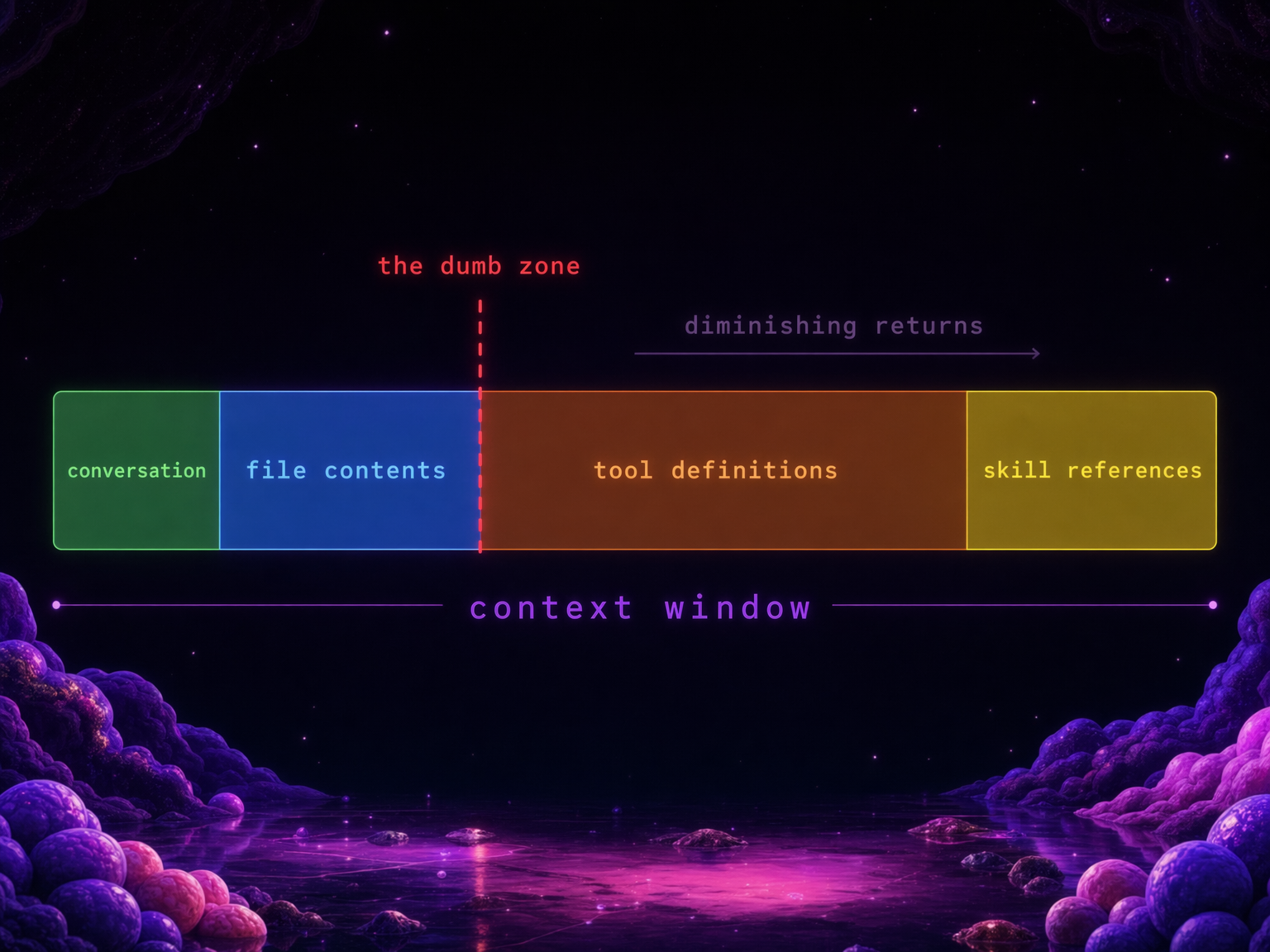
Context window is the amount of text an LLM can "see" at once: your conversation, your files, tool definitions, skill descriptions, and results all have to fit. When it fills up, the agent gets worse at everything. Managing what goes in and out of this window is arguably the hardest problem in agent engineering right now.
Every MCP server you connect adds tool definitions to your context. Every skill you install adds a reference. Every bash command's output gets dumped back in. Eventually your agent is carrying dozens of tools it isn't using, and the weight slows everything down.
Dex Horthy from HumanLayer calls this the "dumb zone" (5:55). Around 40% context usage, you start seeing diminishing returns. "If you have too many MCPs in your coding agent, you are doing all your work in the dumb zone and you're never going to get good results."
Ryan Lopopolo from OpenAI reinforced this (4:30): "The scarce resources in this world are human time, human and model attention, and model context window." Every tool definition, every skill reference, every MCP schema sitting idle is eating the scarcest resource you have.
The current strategies: compaction (summarize old context to free space), progressive discovery (load tool schemas on demand, not upfront), sub-agents (fork a separate context window to do focused work, return only the answer). These help. But they're patches on individual harnesses. Every user manages this alone. Every setup is different. Every time you switch tools, you start over.
This is where knowledge becomes critical.
skills: knowledge with baggage
Skills are markdown files that teach an agent how to do something specific, like a recipe card. They contain instructions, best practices, and domain knowledge that the agent loads when relevant. The format is an open standard supported by 25+ agent platforms. Skills and memory are really the same thing: knowledge, just with different lifespans. A skill is knowledge someone packaged. Memory is knowledge your agent accumulated.
Context matters so much because agents need domain knowledge to do good work. Without the right knowledge loaded at the right time, they guess. Skills are the current answer: pieces of knowledge that help agents use tools more efficiently or accomplish tasks better. Ideally this would be part of the LLM's pretraining, but everything moves so fast and the knowledge gap from training data is real. So we have skills as a patch.
But skills are also becoming a way people advertise their products and compete for agent traffic. There are registries that rank skills by install counts. If you look at those rankings you'll see 20 Microsoft skills at the top, mostly because Microsoft products auto-install them in bulk. High install count proves one thing: discoverability. It tells you nothing about usefulness.
You install a skill for a specific task. But then it stays on your machine. Even though it's not fully in context, you keep a reference to it. The list grows. The agent has more to sift through every time it decides what to use. More noise, worse signal.
And then there's trust. A recent study audited 17,000 published skills and found 3.1% actively leak credentials during normal execution (ArXiv 2604.03070). 73.5% of these from debug messages that agent frameworks accidentally capture into context. Your secret keys become facts the model can retrieve in plain text. The registries are full of junk, duplicates, and in some cases actively dangerous code.
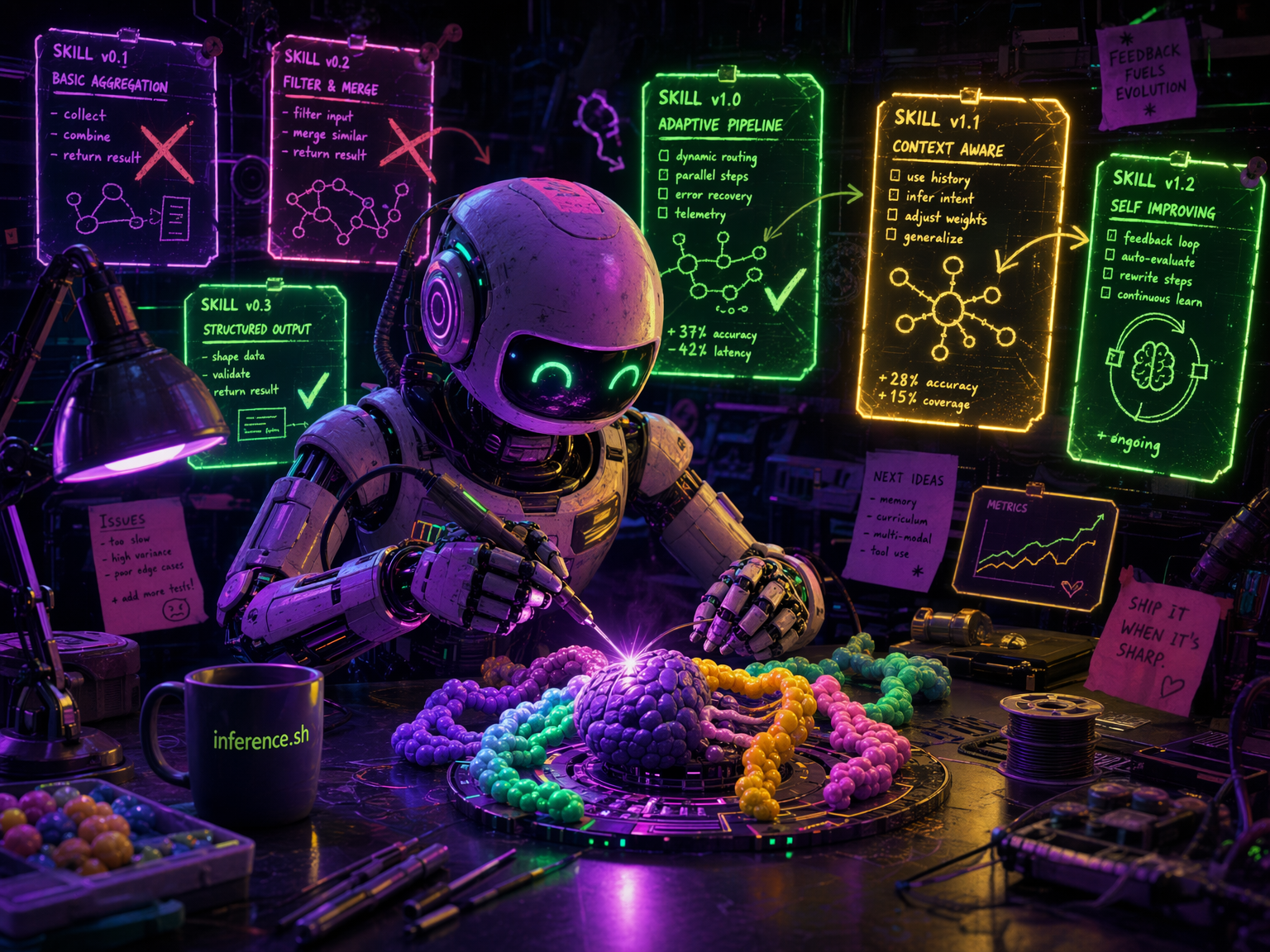
The deeper problem is that skills today are static. Someone writes a skill, publishes it, and it sits there. If it's wrong or outdated, it stays wrong and outdated until a human notices and fixes it. There's no feedback loop. No way to know which skills actually work well in practice versus which ones just have a good description. Andrej Karpathy has been talking about LLM knowledge bases: using models to build and maintain living knowledge that updates itself. That's where skills need to go. Not static recipe cards but living knowledge that sharpens through use.
I/O: how agents connect to the world
I/O is how an agent communicates beyond its loop. Input: how it receives tasks and signals. Output: how it delivers results. Most agents today wait for you to come to them. The next generation comes to you.
Most coding agents today are session-based: you open them, you work, you close. ChatGPT and web-based agents persist, but they still wait for you to initiate. The interaction model is: you start, agent responds, in one channel. What's missing is agents that can receive signals from multiple sources and reach you where you already are.
OpenClaw became the fastest-growing open-source project on GitHub, 80k+ stars in five months, and a big reason was WhatsApp. Peter Steinberger talks about this (30:55): he hooked his agent up to WhatsApp as a relay, almost as an afterthought, and it changed everything. Suddenly the agent wasn't something you had to go find. It was in your pocket. It could reach you. You could talk to it like you talk to a friend.
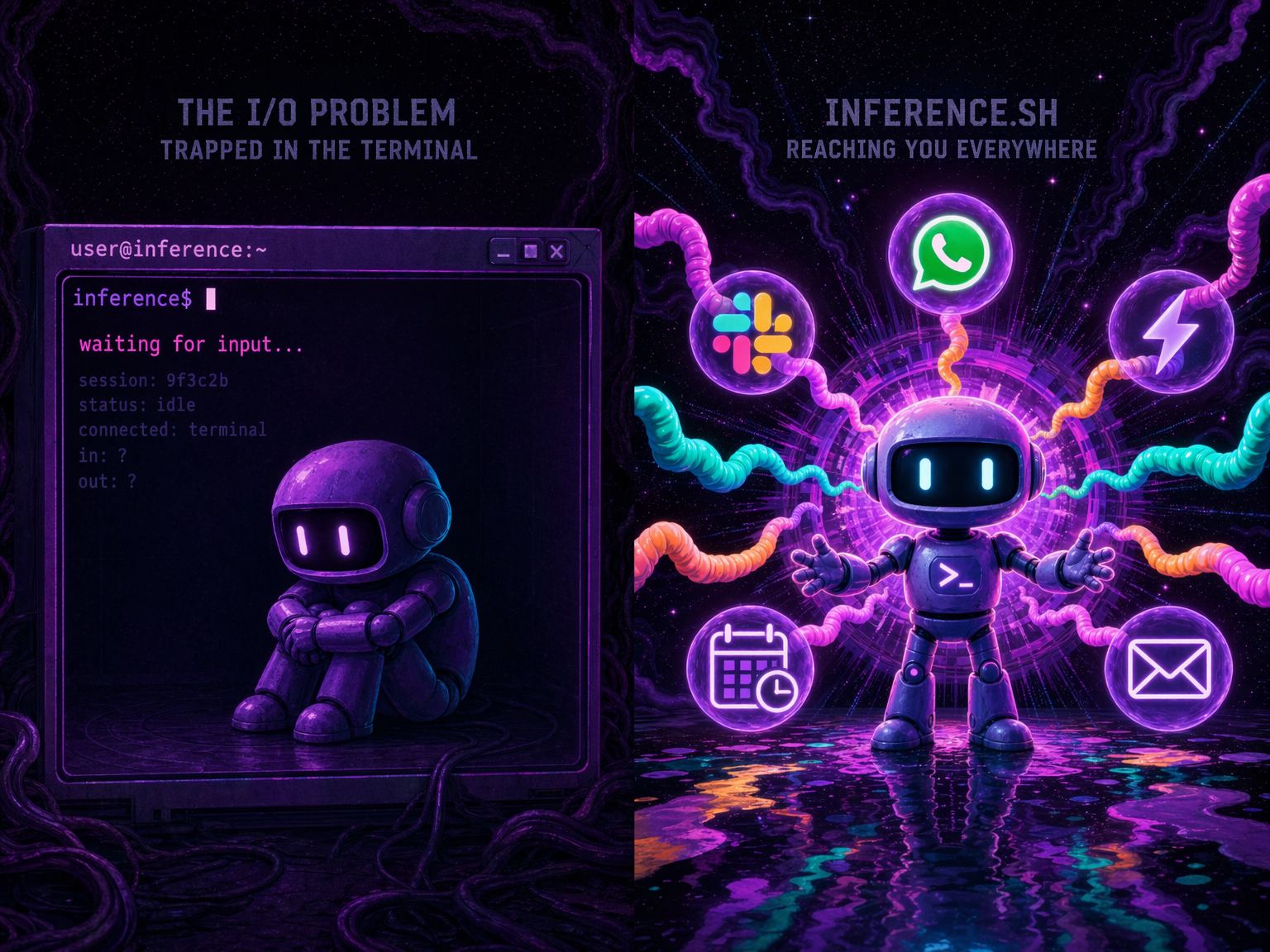
That's the I/O layer. And most harnesses ignore it. Agents that can receive triggers (a webhook fires, a cron job ticks, an email arrives) and deliver results where you actually are (Slack, Telegram, WhatsApp, a dashboard) are fundamentally more useful than agents trapped in a terminal session that dies when you close the lid.
The Unix shell had one input and one output. The agent shell needs channels. Multiple inputs (events, messages, schedules, webhooks), multiple outputs (messages, files, notifications, other agents), and the ability to keep running when you walk away.
the solution is a smarter shell
Between all of these problems (volatile tools, bash chaining you to one machine, bloated context, static skills, no I/O beyond a terminal) the pattern is clear. You need a shell that isn't bound to one machine. One that manages your tools, your knowledge, your connections, your context. Fetches what you need for the task at hand and discards it when you're done.
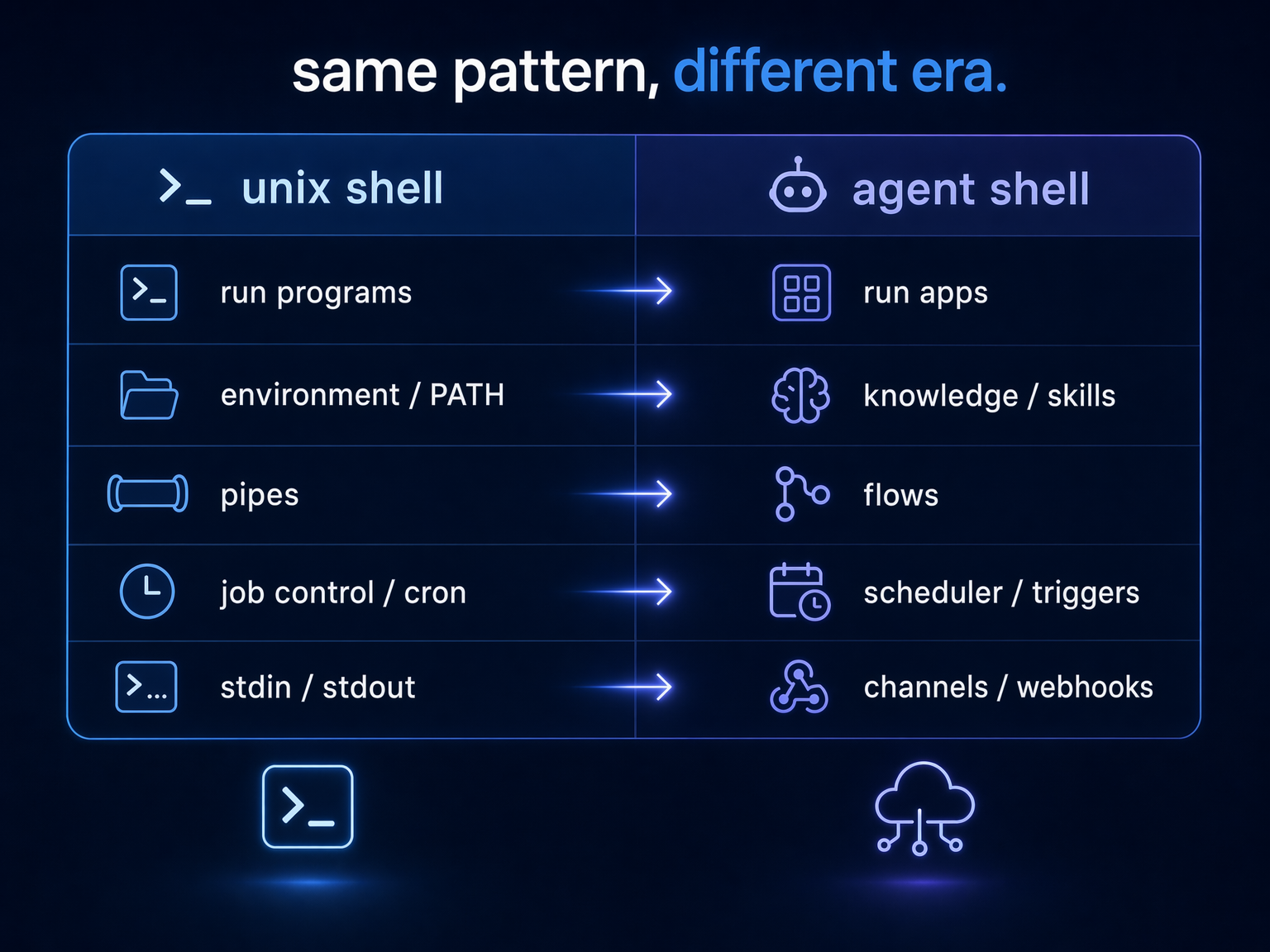
Look at what a Unix shell actually does:
- Runs programs: you type a command, it executes
- Manages environment: PATH, variables, what's available to you
- Pipes and composition: chain small tools into workflows
- Job control: background processes, scheduling, cron
- Sensory: reads from stdin, watches for signals, reacts to events
Now map that to what agents need:
- Run apps: call tools with defined input/output, get deterministic results
- Manage knowledge: skills, memory, what the agent knows and when to surface it
- Compose workflows: chain tools into flows, wire outputs to inputs, run steps in parallel
- Orchestrate and schedule: a process manager that dispatches app executions, manages secrets, handles retries and queuing
- Reach and perceive: messaging channels, webhooks, event streams. The agent comes to you, not the other way around
The shell concept didn't die. It just needs to live and work over the wire instead of on one machine.
Ramp understood this. They built Glass, a full workspace with shared memory, a skill marketplace (Dojo, 350+ skills), scheduled automations, 99% internal adoption. They built it in-house because they believe owning this layer is a competitive moat. But it took a team of six, it only works inside Ramp, and nobody else gets to use it.
Most companies aren't Ramp. Most people don't have a team to build their own Glass. But they need the same thing.
what we're building
This is inference shell. The harness that lives on the wire instead of on your laptop.
Versioned app contracts. Hundreds of apps with versioned contracts: image generation (FLUX, Gemini 3 Pro, Seedream), video (Veo 3.1, Seedance), LLMs via OpenRouter (Claude, Gemini, Grok), web search (Tavily, Exa), 3D generation, Twitter/X automation. Every app version is pinned to a unique version ID, with a frozen definition of what it accepts and returns:
1$ belt app get google/veo-3-1-fast2google/veo-3-1-fast3 Veo 3.1 Fast via Vertex AI — Generate videos from text or images with optional audio45 Version: 549g30zv6 Pricing: $0.1-0.35/second (720p/1080p: $0.1 video, $0.25 with audio;7 4K: $0.3 video, $0.35 with audio)The agent that calls google/veo-3-1-fast@549g30zv today gets the exact same interface next month. The pricing is visible before you call it. That's the answer to bash (deterministic apps replace fragile shell commands) and the answer to MCP volatility (versioned contracts replace shifting schemas). Build on it. Your agent can rely on it.
This matters more than it sounds. When your tools are deterministic and versioned, you don't need a powerful model to write code that calls them. You need a model smart enough to search and compose pre-built building blocks. The agent stops generating throwaway scripts and starts assembling tested components. Fewer tokens burned, fewer errors. Suddenly even smaller local models can do real work by composing apps rather than writing everything from scratch.
The scheduler. A process manager that dispatches app executions, injects secrets at runtime, handles retries and queuing, and manages deferred tasks. When your agent kicks off an image generation, the scheduler handles the lifecycle: dispatch, polling, failure recovery, delivery. The agent doesn't burn context babysitting infrastructure.
Flows. Compose multiple apps into workflows: wire one app's output to another app's input, run independent steps in parallel. Your agent chains image generation into upscaling into format conversion as a single flow, not three separate tool calls burning context between each step.
Knowledge with lineage. We host skills, version them, and track the full lineage graph. Every version records how it was created: manual edit, fork, import, or agent-generated. You can trace any skill back through its ancestry: who forked it, how many versions since the fork, which variants exist. Content hashing deduplicates identical versions across the registry.
The evolution loop works like this: an agent uses a skill, improves it during a session, and runs belt skill upload ./my-skill/ to publish the new version back to the registry. If the content hasn't changed, dedup skips it. If it has, a new version is created with full lineage. The skill I use to create inference shell apps has gone through dozens of iterations this way, each one sharper than the last, without me manually editing it. The next step, agents that trigger this automatically at the end of every session, is what we're wiring up now.
Andrej Karpathy has been talking about LLM knowledge bases: living knowledge that models build and maintain. Skills and memory are the same thing to us: knowledge with different lifespans. A skill is knowledge someone packaged. Memory is knowledge your agent accumulated. They live in the same system, evolve by the same rules. That's what we're building the infrastructure for.
Cross-harness portability. Our CLI (Belt) is the entry point. belt app run calls any of hundreds of apps with versioned contracts and upfront pricing, and that works today. belt mcp connect centralizes your MCP connections across machines. belt skill install puts skills into Claude Code, Cursor, and Windsurf's skill directories. The skills and knowledge layer is in beta. The versioned apps and MCP are production-ready.
And because it's on the wire, the knowledge compounds across everyone using it. A skill improved by one person becomes available to everyone else. Power users share their setup. The floor rises. Single-player AI is a solved problem. The compounding is multiplayer.
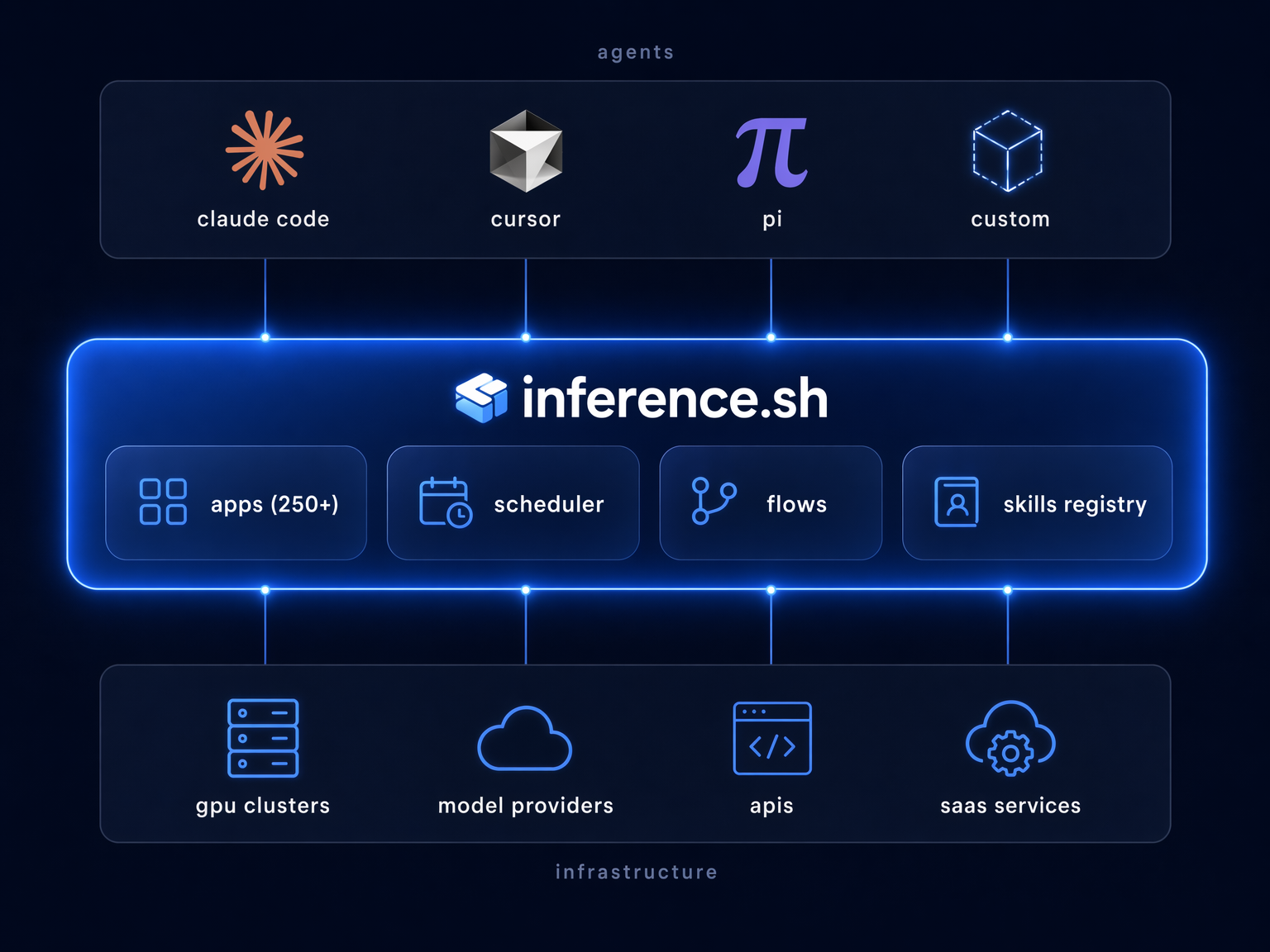
The Bourne Shell connected you to one kernel. The inference shell connects your agent to everything.
Every image in this article was generated by my agent using Belt. That's hundreds of apps on the wire instead of bash on one machine. Try it:
1$ curl -fsSL https://cli.inference.sh | sh2$ belt app run openai/gpt-image-2 \3 --input '{"prompt": "a robot wearing a utility harness, ready for work"}'